
This STEP to STL converter turns a CAD part into a file that a slicer can open. You can choose Draft, Balanced, or Fine mesh quality before making the STL. The STEP file stays on your computer because the conversion runs in your browser.
Why convert a STEP file to STL?
STEP is made for CAD design. Most slicers need an STL instead. Converting the model lets you prepare a part from Fusion, SolidWorks, FreeCAD, Onshape, or another CAD app for 3D printing without changing the original design file.
Choose your mesh quality
The Final Mesh Quality control lets you decide how smooth the STL should be. Choose a setting, then click Convert to apply it. The preview, triangle count, and file size update when the conversion finishes.
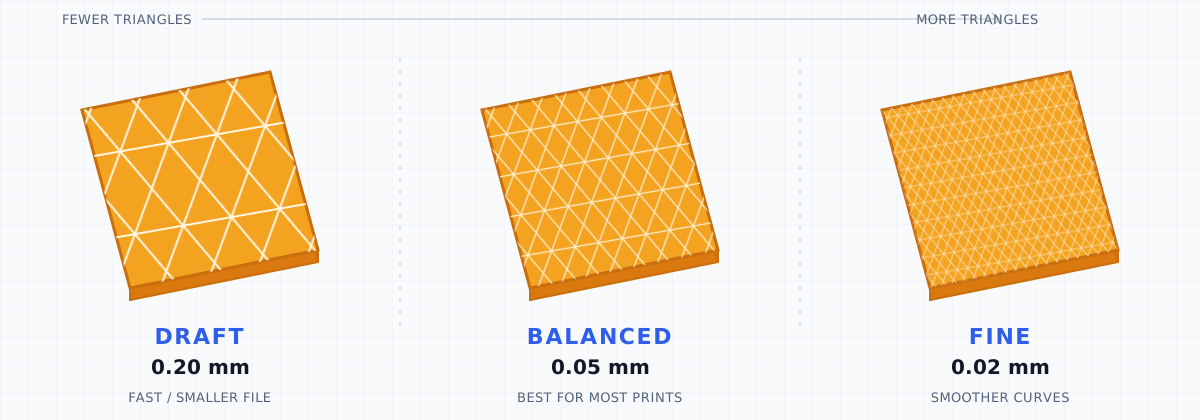
- Draft (0.20 mm) makes fewer triangles and a smaller file. It is useful for quick checks and simple parts.
- Balanced (0.05 mm) is the best place to start for most 3D prints. This is also the setting the converter used before quality choices were added.
- Fine (0.02 mm) uses more triangles to make curved areas look smoother. It takes longer and makes a larger file.
The smaller millimeter number follows curves more closely. It does not improve the original CAD model or add missing detail. Fine can help with small round features, but Balanced is usually enough for normal printing.
How to convert STEP to STL online
- Upload a
.stepor.stpfile from your computer. - Check the 3D preview and make sure the size looks right.
- Choose Draft, Balanced, or Fine under Final Mesh Quality.
- Click Convert to apply that quality and make the STL in your browser.
- Check the updated preview, triangle count, and file size.
- Download the
.stlfile and open it in your slicer before printing.
No account is required. Your model is not uploaded or sent to PrintNexus servers.
What changes when STEP becomes STL
STEP can store smooth shapes, separate parts, names, colors, and other CAD information. STL stores only the outside shape as triangles. The converter turns the visible shape into one STL file.
The shape and size carry over in millimeters. Editable sketches, CAD steps, colors, material names, part names, and the way parts are grouped do not. Choosing Fine cannot bring back details that are missing from the STEP file.
Common STEP to STL problems
Curves look blocky: Choose Fine, click Convert, and check the new preview. If flat areas look wrong too, the STEP file may have damaged or missing surfaces.
The STL is too large: Try Balanced or Draft. More triangles do not always make a better print.
The size looks wrong in the slicer: STL does not save a unit label. This tool uses millimeters, but you should still check the size before slicing.
Separate parts become one file: The output is one STL. Check the preview for parts that overlap or sit apart before printing.
The slicer says the mesh is broken: Gaps or other problems in the STEP file can remain in the STL. Try your slicer's repair tool or fix the model in the original CAD app.
About STEP and STL
STEP, also called STP, is a CAD file format. It is good for moving accurate models between design programs. Most slicers do not use it directly.
STL is a simple 3D file supported by nearly every slicer. It is easy to share and print, but it does not keep colors or editable CAD information.
What to do next
Open the downloaded file in the Free Online STL Viewer for another geometry check. Use the Free STEP to 3MF Converter if you want a modern print container, or the Free STEP to OBJ Converter if you need a mesh for editing rather than slicing.