Table of contents
Last verified: November 3, 2026
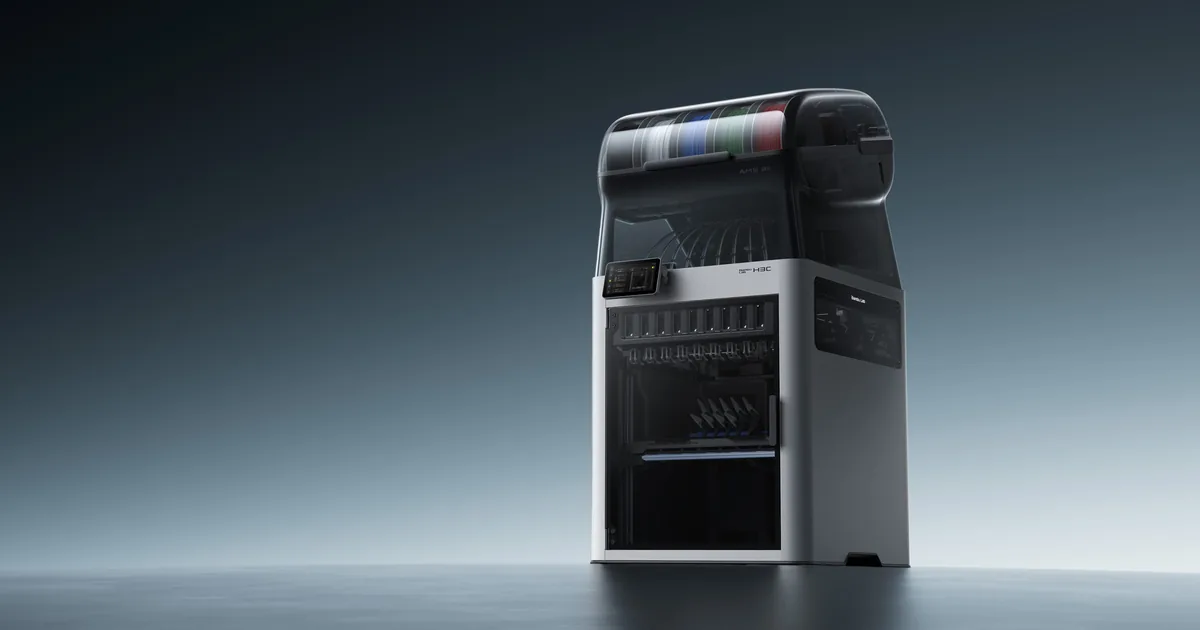
The Bambu Lab H3C is finally out and at a really competitive price. It costs $2,499 in the US, and that gets you the printer, nine tools and a nine-slot AMS 3H with a built-in dryer. That is a ton of printer for the money.
We really thought this thing would cost $3,000 to $3,500, so we were off by at least $500, and we are happy to be wrong about that. We think this printer is going to be awesome, and we were so excited about it that we already bought one to test.
It hasn't shown up yet, so everything here comes from Bambu's specs, the fine print, and our own eyeballs. We also ran five popular MakerWorld models through the new Bambu Studio to see how much time and filament the H3C really saves.
Bambu Lab H3C at a Glance
| Detail | H3C |
|---|---|
| Price | $2,499 for the H3C Combo |
| Tools | 9, with 8 for 1.75 mm filament and 1 for 2.85 mm flexible filament |
| Swap system | Swaptek |
| Tool change | 3.4 seconds |
| Material switch | As little as 6 seconds |
| Waste per swap | As little as 0.038 g |
| Build volume | 330 x 320 x 325 mm |
| Max nozzle temperature | 350°C |
| Max bed temperature | 120°C |
| Max chamber temperature | 65°C |
| Max speed | 1,400 mm/s |
| Max acceleration | 25,000 mm/s² |
| Filament system | AMS 3H with 9 slots, 2 of them can dry at up to 85°C |
| Size with the AMS 3H | 493 x 571 x 1,016 mm |
| Weight with the AMS 3H | 36.28 kg |
| Network | Wi-Fi 6, no Ethernet |
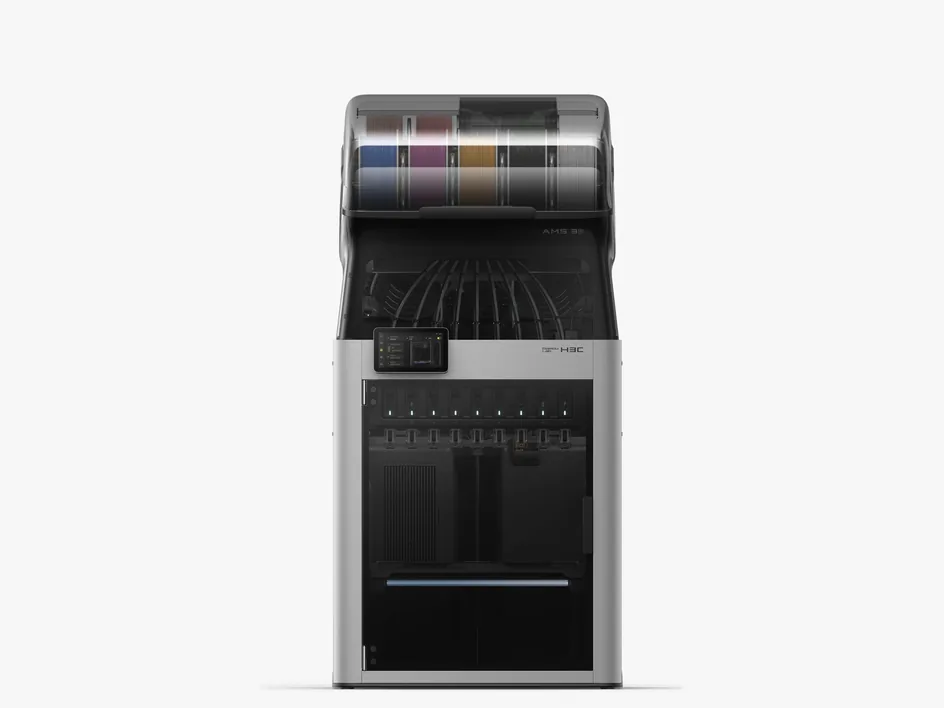
How Much Does the Bambu Lab H3C Cost?
The H3C starts at $2,499 on the US store, and Bambu forces you to buy the AMS 3H with it. It's the same thing Bambu did when the H2C came out, and you still can't buy an H2C on the US store without an AMS so we don't expect this to be an option either with the H3C later down the line.
| Bundle | US price | What you get on top of the printer, AMS 3H and nine tools |
|---|---|---|
| H3C Combo | $2,499 | Nothing extra |
| H3C Combo with Filament Starter Pack | $2,589 | CMYKW PLA plus 75A TPU in black or cyan |
| H3C Full Combo | $2,799 | CMYKW PLA, black 75A TPU and the Bambu Station L FRAME Edition |
At regular price, the H3C is only $300 more than the H2C Combo's $2,199, which we think is a great deal for nine tools. The H2C Combo is down to $1,899 in Bambu's Black Friday sale right now, so the gap between the two is $600 during the sale.
Add-Ons
The H3C can do even more if you add to it. You can mix nozzle sizes with extra hotends, cut, draw and deboss with the Crafting Upgrade Kit, and connect older AMS units with the Buffer. Here is what the H3C accessories cost on the US store:
| Add-on | US price | What it's for |
|---|---|---|
| Bambu Hotend - H3C | $29.99, normally $34.99 | A spare nozzle for one tool |
| Bambu High Flow Hotend - H3C | $59.99 | Faster printing on one tool |
| Multi-Size Hotends Kit | $244.93, or $205 with the printer | Four 0.2 mm, two 0.6 mm and one 0.8 mm hotend |
| Crafting Upgrade Kit | $140 | Cutting, drawing and debossing |
| Buffer for External AMS | $24.99 | Connecting older AMS units |
| BirdsEye Camera | $24.99 | Easier alignment for cutting and drawing |
| Bambu Station L | From $249 | A stand with storage underneath |
| E1 Air Purifier | $199 | Filtering the air around the printer |
The H3C's AI monitoring works without the BirdsEye Camera, and Bambu plans to add extra monitoring that uses the camera in the first half of 2027.
What's in the Box
The H3C Combo comes with:
- The H3C printer and the AMS 3H
- Eight 0.4 mm tools for 1.75 mm filament
- One 0.4 mm tool for 2.85 mm filament
- A Textured PEI build plate
- A power cord for the printer and a separate one for the dryer
- A Bambu Bus 6-pin cable and an accessories box
The base Combo doesn't list any filament, so bring your own or grab one of the starter packs.
What the H3C Can Do
This is the part we are most excited about, because there is a lot going on in this printer.
Nine Tools, Each With Its Own Filament Path
Bambu calls this system Swaptek, and it's the big deal in this release. Each tool has its own filament path and its own heater, so every material stays loaded and ready. The printer doesn't have to pull one filament back before loading the next one, and that is where a lot of the waste on a normal AMS comes from.
A tool change takes 3.4 seconds and a full material switch takes as little as 6 seconds, which is really fast. For comparison, a color change on our P2S takes about a minute and a half in Bambu Studio. Active Pre-Heat warms up the next nozzle while the current one is still printing, so it's ready when the toolhead picks it up.
We also looked at the H3C's printer file in Bambu Studio, and the way it gets that speed is really clever. The heating rate is set at 7.5, compared to 13.3 on the H2C's induction hotends, but parked tools only cool at 0.8, compared to 3.4 on the H2C. So the quick swaps seem to come from keeping the tools warm, so they don't have far to heat back up.
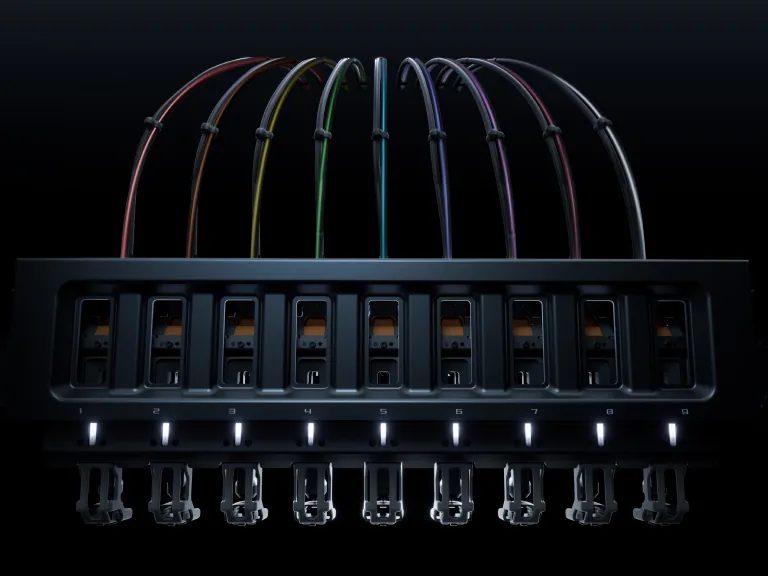
The Rack Moves Out of Your Way
We spotted this in Bambu's teaser and it's real. The tool rack retracts when it's not in use, so you get a clear view into the chamber while you print. On a tool changer that parks its tools across the front, the rack sits right where you look to check on your print, so in our opinion this is a really smart fix. Hint hint, Prusa.
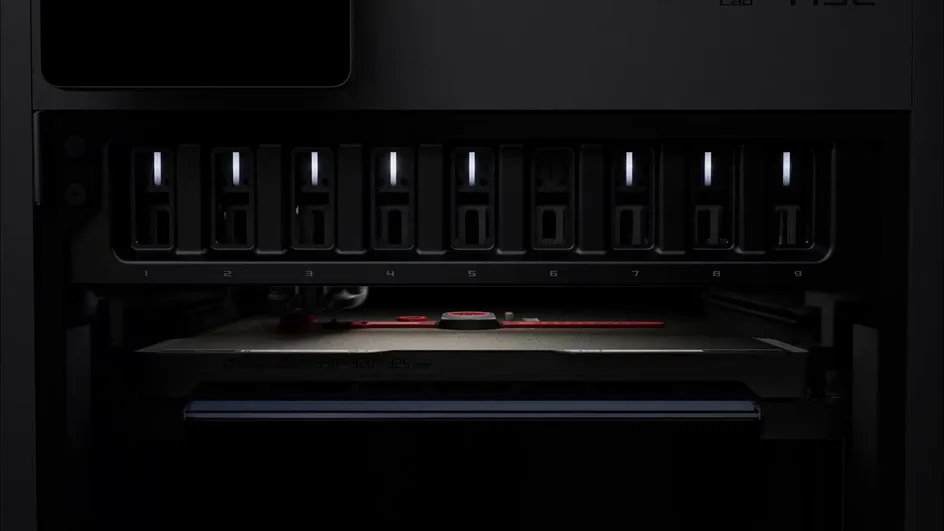
Color Mixing With CMYKW
This is the feature we are most excited to try. You load cyan, magenta, yellow, black and white PLA into five tools and the H3C layers them to make a huge range of colors, so you don't need a spool for every shade.
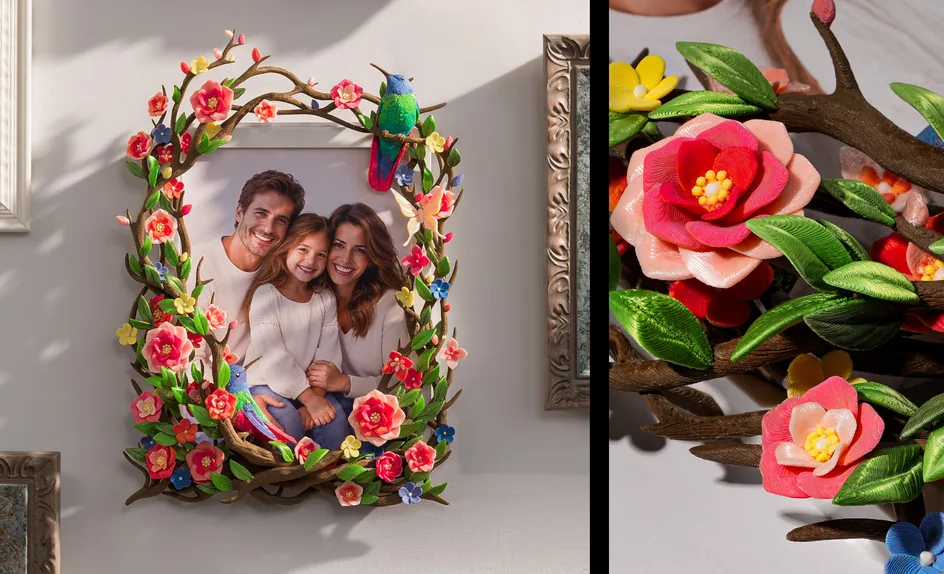
It needs Bambu's CMYKW PLA Palette filament, which is what comes in the starter packs. Bambu's example is a floral frame that uses five tools for color, one for PVA supports and three for silk and wood PLA. It looks stunning.
Soft TPU
The FlexFeed extruder handles both 1.75 mm and 2.85 mm filament. Thicker 2.85 mm TPU is less likely to buckle, so Bambu says the H3C can print TPU as soft as 75A at up to 3x the flow of its older printers. If you've ever fought with soft TPU on a normal printer, that is a big deal.
Bambu sells 2.85 mm filament in 75A TPU right now and it says more is coming. It goes in through the bypass feed and not the AMS, and slots 2 and 4 don't have one.
Mixed Nozzle Sizes
The H3C can run different nozzle sizes in one print, from 0.2 mm to 0.8 mm, and Bambu Studio gives each one a layer height that suits it. Bambu's example is a watch with a 0.2 mm nozzle for the dial, 0.4 mm for the case and a TPU nozzle for the band.
Every tool comes with a 0.4 mm hotend, and you can add the other sizes whenever you want. Swapping a hotend only takes three screws and under a minute.
Bambu says this is coming to the H2D in late November and to the H2C and X2D in February 2027, and a bit later on printers with a Filament Track Switch.
Cutting, Drawing and Debossing
The optional CutTool, DrawTool and DebossTool dock like regular tools and switch automatically, so one job can print, cut and draw without you touching it, which is really cool. The Crafting Upgrade Kit costs $140.
The Rest of the Hardware
All nine nozzles are hardened steel and reach 350°C, and the chamber heats to 65°C. The toolhead is 40% lighter than the H2D's and top speed is 1,400 mm/s.
Bambu also added automatic calibration for all nine tools, and a new error system called MiniWiki walks you through most fixes right on the printer's screen, so no more need to scan a QR code.
We Sliced Popular MakerWorld Models on the H3C, H2C and P2S
We wanted to see what this thing can really do, so when Bambu Studio added the H3C on launch day, we grabbed five popular multicolor models from MakerWorld and sliced each one for the H3C, the H2C and our P2S. Every printer got its stock 0.20mm Standard settings and Bambu PLA Basic, so the printer is the only thing that changes.
| Model | Colors | Swaps | P2S | H2C | H3C |
|---|---|---|---|---|---|
| Cute Happy Fox by Molodos | 4 | 744 | 24h 45m, 395.6 g | 9h 40m, 58.4 g | 4h 52m, 41.2 g |
| Cute Red Panda by 3DPrintyi | 4 | 526 | 18h 41m, 266.2 g | 8h 54m, 35.8 g | 4h 44m, 25.0 g |
| Jack Skellington by 29FLO | 3 | 448 | 25h 5m, 252.7 g | 14h 53m, 42.7 g | 11h 36m, 35.1 g |
| Grogu by xchris | 5 | 443 | 14h 47m, 186.4 g | 7h 13m, 42.8 g | 3h 41m, 30.1 g |
| Piccolo, one plate, by model lover | 4 | 70 | 4h 50m, 36.8 g | 3h 29m, 8.1 g | 2h 43m, 6.7 g |
Each printer's column shows the print time and then the filament wasted on purging and the prime tower.
The H3C Crushes Our P2S on Multicolor
These numbers are wild! The H3C wasted about 82% to 91% less filament than our P2S and cut the print time by about 44% to 80%. The Cute Happy Fox is the craziest one. On the P2S it wastes 395.6 g to print an 85.7 g model, so you are throwing away over four times as much plastic as you keep. On the H3C that drops to 41.2 g and it finishes almost 20 hours sooner.
The H3C Beats the H2C on Speed
The H3C was faster than the H2C every time, by anywhere from 46 minutes to almost 5 hours. On the Cute Happy Fox that's 9h 40m down to 4h 52m. Part of that gap comes from less purge time and the rest comes from its faster motion. The waste is closer, with the H3C wasting about 17% to 30% less, which shows how good both of these printers are at cutting purge. So if you already own an H2C you are still in great shape, and the big reason to upgrade is speed.
The More Swaps, the More You Save
The Piccolo plate only has 70 swaps, so the H3C saved about 2 hours and 30 g over the P2S. The Cute Happy Fox has 744 swaps, and the H3C saved almost 20 hours and about 354 g. So the more color changes your prints have, the more you get out of this printer.
How Bambu's 0.038 g Holds Up
Bambu says a swap can purge as little as 0.038 g, and our results back that up pretty well. Across these five models, the H3C's total waste worked out to about 0.05 to 0.10 g per swap once you count the prime tower.
H3C vs H2C
Overall we think the H3C is the better pick for most multicolor printing. The H2C is still a great printer if you need any filament to work with any nozzle size, or if you would rather save $600 right now.
| Detail | H3C | H2C |
|---|---|---|
| US Combo price | $2,499 | $2,199, or $1,899 on sale |
| How it swaps | Nine tools, each with its own filament path | Vortek, with six induction hotends in a rack plus one regular hotend on the left |
| AMS in the Combo | AMS 3H, 9 slots, 2 can dry | AMS 2 Pro, 4 slots, with drying |
| Max speed | 1,400 mm/s | 1,000 mm/s |
| Max acceleration | 25,000 mm/s² | 20,000 mm/s² |
| Filament size | 1.75 mm, plus 2.85 mm for soft TPU | 1.75 mm |
| Max build volume | 330 x 320 x 325 mm | 330 x 320 x 325 mm, smaller when printing with both nozzles |
Did Bambu Retire Vortek?
Bambu says no. Its FAQ says the H2C won't be discontinued and that the two printers are "built for different jobs." The H2C can pair any filament with any nozzle size automatically, while on the H3C each filament stays with the tool it's loaded into.
That is a real difference, and it matters for engineering work and for printers shared between people. For most makers printing in color, faster prints matter more, so we still think the H3C is where Bambu is headed even if the H2C sticks around for a while.
If you own an H2C, don't panic. It's still an amazing printer, and our slicer test shows it is right up there with the H3C on waste. We just hope Bambu keeps providing support and replacement parts for years to come.
H3C vs Prusa CORE One + INDX
| Detail | Bambu Lab H3C | Prusa CORE One+ with INDX |
|---|---|---|
| Tools | 9 | 4 or 8 |
| Tool change time | 3.4 seconds | About 12 to 14 seconds |
| Setup | Built in | Upgrade kit, several hours to install |
| US price | $2,499 with the AMS 3H | $1,748 (4 tools) or $1,998 (8 tools) |
On paper the H3C wins on swap speed and tool count, and it's ready to go with nothing to build. The Prusa setup costs about $500 to $750 less and you get to work on it yourself, which some makers want. We can't wait to see how they compare side by side. Our Bondtech INDX guide covers the Prusa side in detail.
A Few Things to Know Before You Buy
We are really excited about this printer, but these are the details we would want to know before spending $2,499.
Eight Regular Tools Plus One for Soft TPU
The Combo has eight tools for regular 1.75 mm filament and one tool for 2.85 mm filament. That ninth tool is made for flexible filament and it comes installed in slot 8. Bambu Studio has two presets for it right now, Bambu TPU 75A and Generic TPU, both at 2.85 mm.
If you want nine colors of regular PLA with low waste, you can add a ninth 1.75 mm tool. The 2.85 mm tool has a different base too, so swapping the hotend alone won't convert it. As of November 3 we can't find a full 1.75 mm tool on Bambu's US store, so we don't know what that costs yet.
Give It Some Room
Bambu built the filament storage right into the machine, so it says the footprint stays about the same as a single-nozzle printer. It is tall, though. With the AMS 3H on top, the H3C stands 1,016 mm tall, which is about 40 inches. Bambu says to put it on the floor or a low, stable surface, and you need a space 593 mm wide, 1,056 mm deep and 1,306 mm tall so the door and the AMS lid can open all the way.
If you put it on the Bambu Station L you need 1,900 mm of height, which is about 6 foot 3.
Two Slots Can Dry Filament
The AMS 3H holds nine spools and it can dry two of them at a time, right in their slots. Those two slots reach 85°C, which is enough for PA, PC and carbon fiber filaments. Slot 8 is one of them, and that is why the TPU tool goes there.
If you have several wet spools you can dry them in turns. You can also dry while you print, as long as the filament stays stable at drying temperature.
You Can Go Up to 24 Colors
If you already own an AMS you can keep using it. With the $24.99 Buffer you can connect up to four older AMS units to reach up to 24 spools, and all of them feed through tool 1.
Those extra colors share one nozzle, so we are guessing they purge like a normal AMS and don't get the H3C's low waste. Bambu doesn't say that outright, so we will see once people test it.
How Bambu Got Its Numbers
The 6-second switch and the 0.038 g of purge both come from Bambu's internal testing under ideal conditions. The 6 seconds was measured with PLA Basic in filament-saving purge mode, so your numbers will probably be different with other filaments and settings.
The store page also says soft TPU flows up to 5x faster in one spot and 3x faster everywhere else. We would go with 3x because that is the number with a footnote, and it compares the 2.85 mm tool to the previous printer running 1.75 mm filament.
Power and Network
The US version can pull up to 1,850 W, and the AMS 3H has its own cord that adds up to 200 W. A normal 15-amp US circuit tops out around 1,800 W. Bambu says the printer only hits max power for about 3 to 5 minutes while the bed heats up.
If your circuit can't handle that, Low Power Mode caps the printer at 1,050 W and the bed and chamber just heat up more slowly. We would plug it into a circuit without much else on it.
It connects over Wi-Fi 6. There is no Ethernet port, network kill switch or removable network module, so it won't suit a shop that needs those.
Can All Nine Tools Reach the Whole Bed?
It looks like it, and that would be a nice upgrade. On the H2C, printing with both nozzles drops the width to 300 mm. Every H3C tool prints from the same toolhead, the store calls the 330 x 320 x 325 mm build volume "usable space," and the H3C's printer file in Bambu Studio doesn't list separate print areas the way the H2C's does. Bambu doesn't say it outright, so we will check when ours shows up.
Should You Buy the H3C?
- Buy it if you print a lot of multicolor or multi-material parts, you are tired of purge waste and you have the floor space.
- Get the H2C if you need any filament to work with any nozzle size, or if the $600 you would save in the sale matters more to you.
- Wait for the P3C if $2,499 is too much. It has seven tool docks in its photos and it should cost a lot less, but Bambu hasn't announced it yet. Here is everything we know about the Bambu Lab P3C.
If you are not in a rush, real owners should start reporting back over the next few weeks. The store also lists 30-day price protection.
Currently I print on a P2S and an A1, design No AMS models for MakerWorld, and sell prints on Etsy. For me the time is what jumps out. The H3C takes the Cute Happy Fox from 24h 45m on my P2S down to 4h 52m, and when you are printing orders, that is more prints out of one printer every day.
It wouldn't change my No AMS models though, because people download those since they don't need an AMS, and I don't see that changing until a lot more people own a printer like this.
Honestly, I couldn't wait, so I already bought one. As soon as it shows up, I will run these same models on the real printer and update this post.
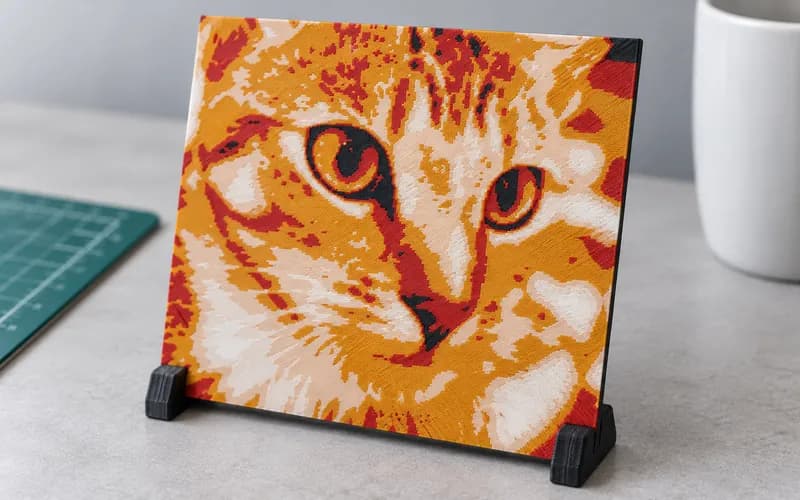
Whatever you print on, check your models in my 3MF Viewer before you slice them. If you sell multicolor prints, the 3D Print Cost Calculator helps you price the extra filament and time. If you want to try layering colors on the printer you already have, my Free HueForge Alternative turns a photo into a filament painting.
Frequently Asked Questions
How much does the Bambu Lab H3C cost?
The H3C Combo costs $2,499 in the US. That includes the printer, the AMS 3H and nine tools. A bundle with filament costs $2,589, and the Full Combo with the Bambu Station L costs $2,799.
When did the Bambu Lab H3C come out?
Bambu launched it on November 3, 2026, and it's on sale now on the US store.
How many tools does the H3C have?
Nine. Eight print regular 1.75 mm filament and one prints 2.85 mm flexible filament, and you can add one more if you want nine tools for 1.75 mm filament.
What is the Bambu Lab H3C build volume?
330 x 320 x 325 mm. That is the same max build volume as the H2C.
Does the H3C come with an AMS?
Yes. Every US bundle includes the AMS 3H, which sits on top of the printer. It has nine slots and two of them can dry filament.
Can I use my old AMS with the H3C?
Yes. With the $24.99 Buffer you can connect up to four older AMS units for up to 24 spools, and they all feed through tool 1.
Is Bambu discontinuing the H2C?
No. Bambu says the H2C will stay on sale because it can pair any filament with any nozzle size automatically, which the H3C can't do.
Is the Bambu Lab P3C out yet?
Not yet. Bambu didn't announce it with the H3C. We keep everything we know about the P3C in its own post.